
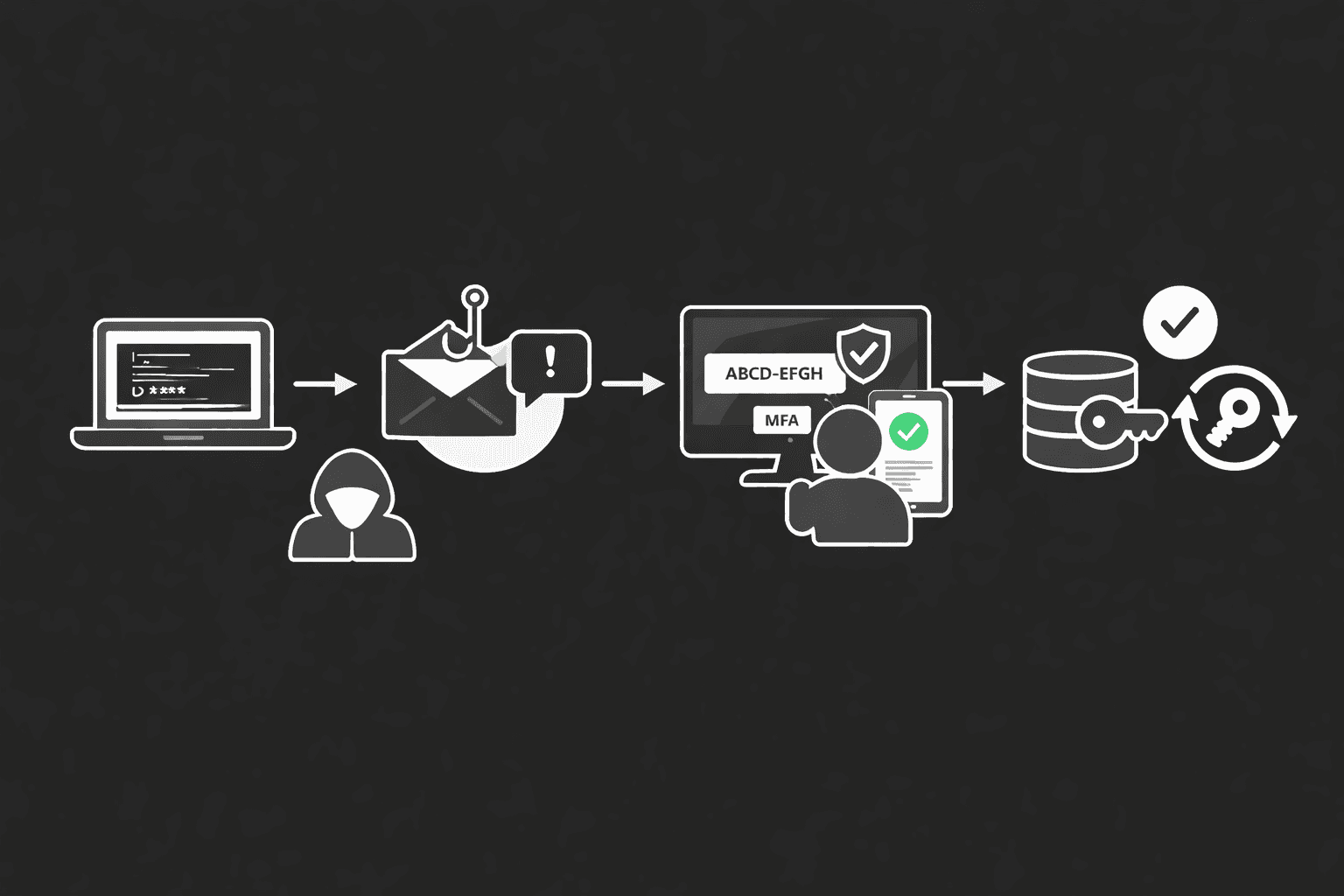
The assumption that multi-factor authentication makes an account impenetrable has cost organizations dearly. In early 2025, Microsoft's threat intelligence team documented a wave of campaigns where adversaries — aided by AI-generated lure content — exploited the OAuth 2.0 device authorization grant flow to harvest persistent access tokens from Microsoft 365 environments, rendering MFA completely irrelevant to the attack outcome. These weren't zero-day exploits. They were abuse of a legitimate authentication mechanism that most enterprise tenants leave wide open.
This post breaks down exactly how device code phishing works at the protocol level, why AI makes it operationally dangerous at scale, what detection looks like in practice, and the concrete controls that actually stop it.
What Is the OAuth Device Code Flow — and Why It's Exploitable
The device authorization grant (RFC 8628) exists for a practical reason: input-constrained devices like smart TVs or IoT sensors can't easily handle browser-based authentication. The flow works by having the device call the /devicecode endpoint, receive a short-lived code and a verification URI (for Microsoft 365, this is microsoft.com/devicelogin), and then display those to the user. The user visits the URI on another device, enters the code, completes authentication including MFA, and the original device polls the token endpoint until it receives an access token.
The design flaw from an attacker's perspective is elegant: the device requesting the token and the human completing authentication are deliberately decoupled. That decoupling is the attack surface.
The Attack Chain, Step by Step
An attacker exploiting this flow follows a straightforward sequence mapped under MITRE ATT&CK T1528 (Steal Application Access Token) and T1566 (Phishing):
- T+0: Attacker calls
https://login.microsoftonline.com/{tenant}/oauth2/v2.0/devicecode, requesting scopehttps://graph.microsoft.com/.default. They receive adevice_code, auser_code(e.g.,ABCD-EFGH), and an expiry window of roughly 15 minutes. - T+1: Attacker sends a phishing lure — email, Teams message, or SMS — instructing the victim to visit
microsoft.com/deviceloginand enter the displayed code. The lure impersonates IT helpdesk, a collaboration tool onboarding flow, or an MFA re-enrollment prompt. - T+2: The victim navigates to the legitimate Microsoft page, enters the code, and completes their normal MFA challenge. From their perspective, nothing is wrong.
- T+3: The attacker's polling loop (
/tokenendpoint, every 5 seconds) receives a valid OAuth token with refresh capability. Session established.
At no point did the attacker touch the victim's credentials or intercept an MFA push. They simply waited for the victim to authenticate on their behalf.
Important: The verification URI (microsoft.com/devicelogin) is real. Standard phishing training — "check the URL before entering credentials" — provides zero protection here because the victim is on the legitimate Microsoft page. This fundamentally breaks the mental model most users have been trained with.
How AI Transforms This From Niche to Scalable
Pre-AI, running this attack at scale had friction: generating convincing, contextually relevant lures for hundreds of targets required manual effort. AI eliminates that bottleneck.
Observed techniques in 2024-2025 campaigns include automated personalization of lure content using scraped LinkedIn and corporate directory data (T1589 — Gather Victim Identity Information), real-time generation of fresh device codes to replace expiring ones mid-campaign, and translation of lure content into target-appropriate languages with near-native fluency. One tracked campaign sent lures that referenced the recipient's specific department, their manager's name, and a plausible internal IT ticket number — all AI-assembled from OSINT in near real-time.
The result is a phishing email that clears most enterprise secure email gateway detections (no malicious URL, no attachment, no credential harvesting page) and passes basic human scrutiny.
Why Detection Is Harder Than It Looks
Traditional email security controls look for malicious infrastructure. Device code phishing has none: the link goes to Microsoft, the domain is clean, and the sender may be a compromised internal account. SIEM correlation rules built around "suspicious URL in email" simply don't fire.
What does generate signal is behavioral: a device code authentication event from a user who has no legitimate constrained-device use case, particularly when followed by token issuance to an IP with no prior history in that tenant.
The Attack Flow Visualized
Here's the complete attack chain from code generation to persistent access:---
Detection: What to Look For in Sign-In Logs
Most SOC teams aren't tuned for device code authentication events because they've never seen them weaponized. The signal is there — it's just not in any default alert ruleset.
Entra ID / Azure AD Sign-In Log Indicators
The key query target is the AuthenticationProtocol field in Entra ID sign-in logs, filtered for deviceCode. Correlate these events against:
| Signal | Normal Baseline | Suspicious Pattern |
|---|---|---|
AuthenticationProtocol = deviceCode | Rare; limited to actual kiosk/IoT devices | Any interactive user account with no registered IoT device |
| Token issuance IP vs historical user IP | Same geography, known ASN | Foreign IP, residential proxy, Tor exit node |
| Time between code request and token grant | Minutes (user processes request) | Under 60 seconds (scripted attacker workflow) |
| Subsequent API calls post-auth | Normal Graph activity | Bulk mail read (T1114), file enumeration (T1083) |
| Refresh token usage | Bound to original session | Used from different IP/device immediately |
A KQL query worth deploying in Microsoft Sentinel:
SigninLogs
| where AuthenticationProtocol == "deviceCode"
| where UserType == "Member"
| summarize count() by UserPrincipalName, IPAddress, bin(TimeGenerated, 1h)
| where count_ > 1
Flag any member account authenticating via device code that isn't in your approved device register.
Pro Tip: Don't just alert on the authentication event. The real forensic value is in the post-authentication Graph API activity. A device code auth followed within 5 minutes by Mail.Read calls across multiple mailboxes is highly indicative of a Storm-2372 or similar campaign pattern. Chain these events in your correlation rules.
Differentiating Legitimate vs Malicious Device Code Use
Legitimate device code flow usage is narrow: Surface Hub devices, some Azure DevOps pipeline scenarios, and legacy PowerShell scripts that haven't migrated to modern auth. In most enterprises, you can enumerate all legitimate device code users in a 30-minute audit. Anything outside that list warrants investigation.
Mitigation: Conditional Access and Token Hardening
Microsoft and the broader identity security community have published clear controls. The challenge is that most organizations have not implemented them because device code phishing wasn't on their radar before 2024.
Conditional Access Policy to Block Device Code Flow
In Microsoft Entra ID, Conditional Access policies can restrict authentication flows. Navigate to Protection → Conditional Access → Authentication flows and create a policy targeting Device code flow for all users except a scoped exclusion group containing your legitimate device accounts.
NIST SP 800-63B and the CIS Controls v8 (Control 6: Access Control Management) both emphasize context-aware authentication — the principle that authentication strength should match the sensitivity of the resource being accessed. Blocking device code flow entirely for most users is a direct implementation of this principle.
| Control | Implementation | Effectiveness |
|---|---|---|
| Block device code flow via CA policy | Entra ID Conditional Access → Authentication flows | High — eliminates the primary attack vector |
| Token binding (preview) | Continuous Access Evaluation + IP-based binding | High — prevents token replay from attacker IP |
| Named locations policy | Restrict device code auth to known corporate IP ranges | Medium — ineffective against enterprise VPN or split tunneling |
| UEBA baseline on Graph API | Microsoft Sentinel, Defender for Cloud Apps | Medium — detects post-compromise behavior, not prevention |
| Security awareness (device code context) | Phishing simulation with device code lures | Low-Medium — education alone insufficient given lure quality |
Token Lifetime and Refresh Policy Hardening
Under ISO 27001 Annex A control A.9.4 (System and Application Access Control), organizations should apply least-privilege access token configurations. For Microsoft 365:
- Set refresh token lifetime to 1 hour for high-value accounts (Global Admin, Exchange Admin, privileged roles).
- Enable Continuous Access Evaluation (CAE) to allow Microsoft to revoke tokens in near-real-time based on user risk signals.
- Disable the device code grant at the application registration level for any first-party app that doesn't require it — this is achievable via the Entra ID app manifest (
allowPublicClient: false).
GDPR Article 32 and HIPAA's Technical Safeguard requirements (45 CFR § 164.312) both mandate "appropriate technical measures" to protect personal data. A breach via device code phishing resulting in bulk mail exfiltration has repeatedly triggered breach notification obligations — the token theft itself may constitute unauthorized access under these frameworks even before data is exfiltrated.
Why This Attack Succeeds — and What Most Defenses Miss
Understanding why this works at the organizational level is as important as knowing the technical mechanism. Device code phishing succeeds for three structural reasons:
Authentication decoupling by design. RFC 8628 deliberately separates the device requesting access from the human authenticating. Security controls built on the assumption that "the person who authenticated is the person using the session" fail completely here.
Lure quality exceeds organizational detection capability. AI-generated phishing content routinely scores above 90% on human believability assessments. The 2024 Verizon DBIR noted phishing as the top initial access vector in breaches involving credential abuse, and the trend line for AI-assisted lure quality is still ascending.
SOC tooling gaps. Most SIEM correlation content packages don't include device code authentication as a monitored event type. It's not in the default Microsoft Sentinel analytics rules as of early 2025 without community content additions.
Important: If your security awareness training doesn't specifically cover device code phishing with hands-on simulation, your users have no frame of reference for recognizing it. Standard "hover over links" training actively misleads them — there is no malicious link to hover over.
Key Takeaways
- Audit your device code flow exposure today. Run the KQL query above against 90 days of sign-in logs. Any member account authenticating via device code with no corresponding registered IoT/kiosk device is a gap requiring investigation.
- Implement Conditional Access for authentication flows. Blocking device code flow for standard user accounts requires one policy and has no impact on normal productivity — it only affects users with input-constrained devices.
- Build detection chains, not point alerts. A device code auth event is interesting; a device code auth followed by bulk Graph API calls is an incident. Tune your SIEM to correlate both.
- Enable Continuous Access Evaluation and token binding. These controls address the post-issuance phase — ensuring a stolen token can be revoked before it does damage.
- Run device code phishing simulations. Your users need to recognize a lure that sends them to a legitimate Microsoft URL. Conventional phishing simulations don't build this muscle.
- Review app registrations for
allowPublicClient. Legacy app registrations with this flag enabled silently permit the device code grant. Enumerate and remediate.
Conclusion
Device code phishing represents a category of attack that MFA was never designed to defeat, because it doesn't steal credentials or intercept authentication — it weaponizes a legitimate user completing their own authentication. The addition of AI-driven lure generation makes this operationally viable at enterprise scale in a way that was impractical three years ago. Organizations still treating MFA as a comprehensive identity control are operating on outdated threat model assumptions.
The controls exist — Conditional Access authentication flow restrictions, Continuous Access Evaluation, token binding, and SIEM detection chains — and none of them require significant architectural change. What's missing in most organizations is awareness that the attack surface exists at all. Run the audit. Block the flow. Build the detection.
Frequently Asked Questions
Does this attack work against phishing-resistant MFA like FIDO2 hardware keys or Windows Hello for Business?
Not directly against the authentication mechanism itself — FIDO2 is origin-bound and won't produce a credential on a device code flow. However, if the tenant still allows fallback to SMS OTP or authenticator app push for accounts enrolled in FIDO2, an attacker may be able to trigger a fallback. The correct control is to enforce FIDO2 as the only allowed method for sensitive accounts via Entra ID Authentication Strengths policy, with no fallback options.
How do I identify whether my organization has already been compromised via this method?
Query your Entra ID sign-in logs for AuthenticationProtocol == "deviceCode" across the past 90 days. Cross-reference any matches against your inventory of legitimate input-constrained devices. For any unexplained matches, pivot to the downstream Graph API audit logs for that token: look for mail.read, files.read.all, or contacts.read operations in the minutes following authentication. Microsoft 365 Defender's advanced hunting tables (CloudAppEvents, AADSignInEventsBeta) support this query pattern natively.
Can this attack be used against non-Microsoft environments?
Yes. The device authorization grant is an IETF standard (RFC 8628) implemented by Google Workspace, GitHub, Okta, and other major identity providers. The specific exploitation mechanics and detection signals vary by platform, but the core attack concept — separating device authentication from token issuance — applies wherever the flow is enabled. Google Workspace logs device code authentication events in the Admin console audit log under token_grant.
What user behavior actually constitutes a red flag that security training should address?
Users should treat any unprompted request to visit microsoft.com/devicelogin (or equivalent) and enter a code with the same suspicion as an unprompted MFA push notification. The rule of thumb: if you didn't initiate a device setup or application connection workflow, you should not be entering a device code anywhere. Legitimate helpdesk-initiated device setups happen in controlled, pre-communicated contexts — not via an unexpected Teams message or email.
What compliance obligations are triggered if a breach occurs via this vector?
For GDPR-covered organizations, unauthorized access to email or files constitutes a personal data breach triggering Article 33 notification obligations (72-hour window to notify supervisory authority) if personal data is involved. Under HIPAA, access to a mailbox containing PHI via stolen OAuth tokens almost certainly constitutes a breach under the HIPAA Breach Notification Rule (45 CFR §§ 164.400–414), as the "low probability of compromise" safe harbor is difficult to apply when token theft is confirmed. PCI DSS 4.0 Requirement 8.6 addresses third-party and service account access controls in ways that are directly implicated by OAuth token abuse in cardholder data environments.

Enjoyed this article?
Subscribe for more cybersecurity insights.