
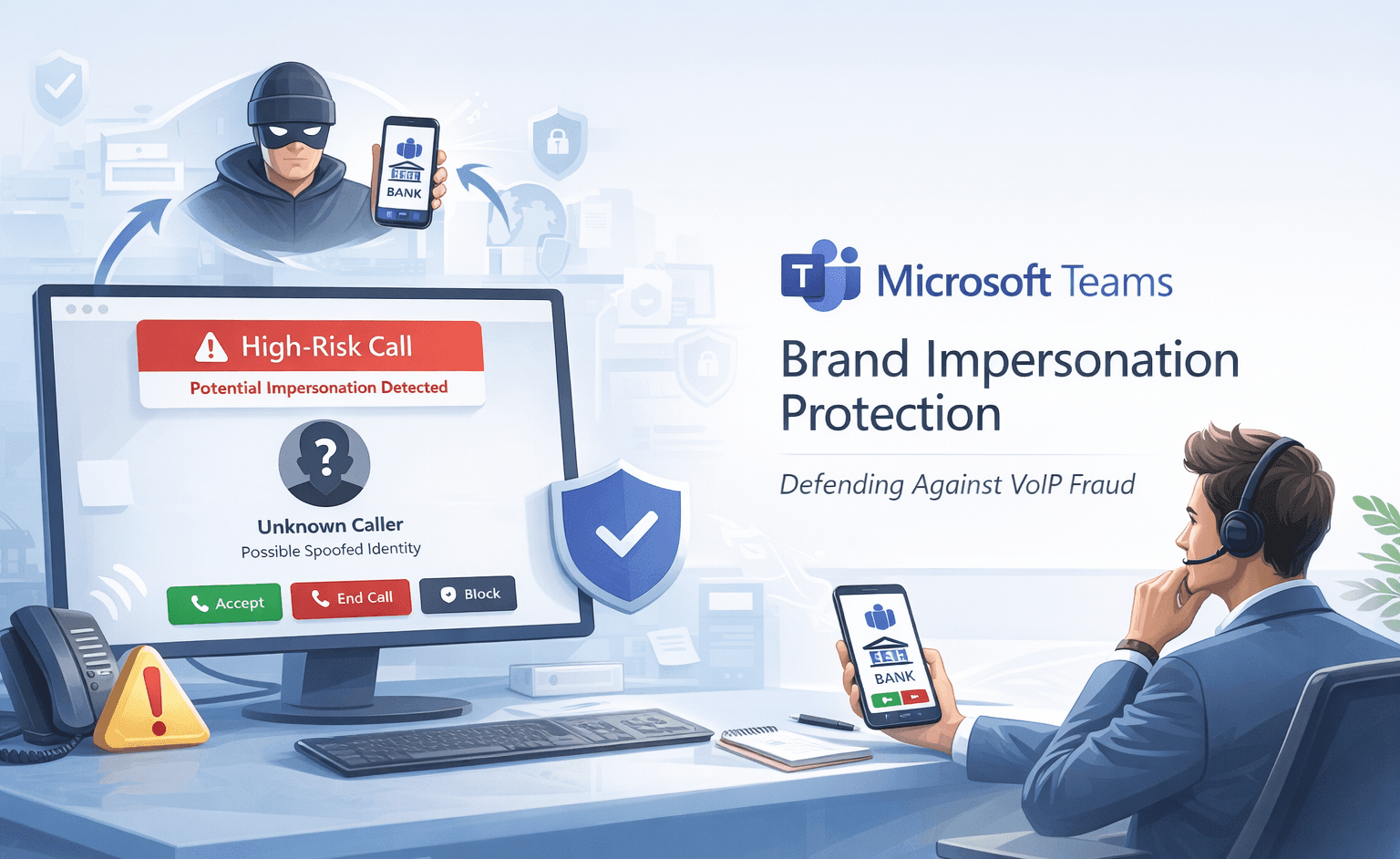
Social engineering attacks have evolved beyond email phishing. In 2025, voice-based fraud attempts increased by 47%, with attackers exploiting trusted communication platforms like Microsoft Teams to impersonate banks, government agencies, and tech support (Cybersecurity Research, 2025). The rise of remote work has made Teams calling a prime target for credential theft and financial fraud.
Microsoft's new Brand Impersonation Protection feature for Teams Calling represents a significant shift in real-time threat detection. By automatically scanning first-time external VoIP callers for spoofing signals, the system warns users before they answer potentially fraudulent calls. This article explores how the feature works, its integration into existing security frameworks, and what IT teams need to know for successful deployment.
Understanding Brand Impersonation in VoIP Attacks
Voice over IP platforms have become sophisticated attack vectors. Unlike traditional phone scams, Teams-based impersonation attacks leverage the platform's legitimacy and user trust to bypass skepticism.
The Mechanics of Teams-Based Fraud
Attackers create external Teams accounts using names and profile images that mimic trusted organizations. When calling unsuspecting users, the fake identity appears legitimate within the Teams interface. Victims often assume the call is authentic because it arrives through their corporate communication system rather than an unknown phone number.
The fraud typically follows a predictable pattern. The caller claims urgent account issues, security breaches, or compliance violations requiring immediate action. They request credentials, payment information, or remote access to systems. The sense of urgency and apparent legitimacy often overrides normal security awareness.
Pro Tip: Attackers frequently target employees during high-stress periods like quarter-end or tax season when urgency feels more credible.
Why Traditional Defenses Fail Against VoIP Impersonation
Standard security controls struggle with VoIP-based social engineering for several reasons:
- Platform trust: Users expect Teams calls to be from verified colleagues or partners
- Visual deception: Fake profiles can closely mimic legitimate organizations
- Real-time pressure: Unlike emails, phone calls demand immediate responses
- Limited verification: Users cannot easily verify caller identity during live conversations
- Cross-platform gaps: Email security doesn't extend to voice communications
These vulnerabilities create opportunities for attackers to exploit the human element despite robust technical defenses elsewhere in the security stack.
Common Impersonation Scenarios
Table: Frequent Brand Impersonation Tactics
| Attack Type | Impersonated Entity | Typical Request | Success Rate |
|---|---|---|---|
| Tech Support Scam | Microsoft, IT Helpdesk | Remote access credentials | 34% |
| Financial Fraud | Bank, Payment Processor | Account verification data | 28% |
| Compliance Threat | IRS, Legal Department | Immediate payment | 22% |
| Vendor Compromise | Trusted Supplier | Invoice payment redirect | 31% |
These scenarios share common characteristics: authority, urgency, and requests for sensitive information or actions that bypass normal verification processes.
How Brand Impersonation Protection Works
Microsoft's detection system operates at the point of call initiation, analyzing multiple signals before the recipient answers.
Signal Analysis and Risk Scoring
The protection feature examines first-time external VoIP callers using behavioral and contextual indicators. When someone outside your organization calls for the first time, the system checks whether their display name, profile information, or calling patterns suggest brand spoofing.
Microsoft's algorithm evaluates factors including display name keywords associated with trusted brands, profile image similarity to known corporate logos, and domain mismatches between claimed identity and actual Teams account. The system assigns a risk score based on these combined signals.
If the score exceeds defined thresholds, Teams displays a "high-risk call" warning before the phone rings. Users see clear notifications about potential impersonation and can choose to accept, block, or end the call before engaging.
User Interface and Decision Points
The warning mechanism provides actionable choices rather than automatic blocking. When a high-risk call arrives, users encounter three options clearly presented in the Teams interface.
Accept allows the call to proceed with continued warning indicators visible during conversation. Block prevents this specific caller from future contact attempts. End rejects the current call without accepting or blocking the caller for future attempts.
This approach balances security with usability. Legitimate external callers occasionally trigger false positives, so Microsoft gives users control rather than implementing hard blocks that could disrupt business communications.
Important: Warning indicators can remain visible throughout the call duration if suspicious signals persist, providing ongoing awareness even after accepting.
Integration with Existing Teams Security
Brand Impersonation Protection extends Microsoft's layered security model for Teams. The calling protection complements existing defenses:
- Malicious URL detection in chat messages
- Weaponizable file-type restrictions in file sharing
- External participant badges in meetings
- First-contact warnings for new external chat senders
By applying similar logic across messaging and voice, Microsoft creates consistent protection regardless of communication channel. Users develop familiarity with warning patterns, improving recognition and response to threats.
Deployment Considerations for IT Teams
Rolling out Brand Impersonation Protection requires minimal technical configuration but significant operational preparation.
Rollout Timeline and Technical Requirements
Microsoft begins deployment to Targeted Release organizations in mid-February 2026, with completion for that ring expected by late February. Desktop Teams clients receive the capability first, including Windows and macOS platforms. Mobile implementations may follow in subsequent updates.
The feature activates by default with no administrator configuration required. Organizations using Targeted Release should prepare support teams immediately. Standard Release ring customers should anticipate arrival within 30-60 days of Targeted Release completion.
Table: Deployment Readiness Checklist
| Preparation Area | Action Required | Timeline | Owner |
|---|---|---|---|
| Help Desk Training | Update call handling procedures | Pre-rollout | IT Support |
| User Communications | Announce new warnings | Week of rollout | IT Communications |
| Policy Documentation | Update acceptable use policies | Pre-rollout | Security Team |
| Incident Response | Define escalation for false positives | Pre-rollout | SOC/Security |
Desktop client compatibility should be verified during preparation. Organizations with customized Teams deployments or legacy client versions may need updates before protection becomes available.
User Training and Communication Strategy
End-user preparation prevents confusion and support volume spikes. Most users will encounter their first high-risk warning unexpectedly, potentially during important business calls.
Effective training messages should explain what triggers warnings, how to interpret risk indicators, and when to report suspicious calls. Emphasize that warnings represent potential risk, not confirmed threats, to prevent users from automatically rejecting legitimate external callers.
Consider these communication approaches:
- Email announcements with screenshot examples of warning interfaces
- Quick reference guides posted to internal knowledge bases
- Short video demonstrations of accepting versus blocking decisions
- FAQ documents addressing common user questions
- Reminder messages during the first two weeks of rollout
Helpdesk staff require deeper training on the underlying detection logic to answer technical questions and troubleshoot false positives effectively.
Managing False Positives and Exceptions
No automated detection system achieves perfect accuracy. Legitimate external callers occasionally trigger warnings, particularly when using generic business names or titles.
IT teams should establish clear procedures for evaluating false positive reports. When users report legitimate callers being flagged, document the caller's Teams account details, claimed organization, and business relationship context.
Microsoft likely provides feedback mechanisms through the Microsoft 365 admin center for reporting false positives. Regular submission helps improve detection accuracy over time. Organizations should designate responsibility for monitoring and reporting patterns in false positive incidents.
Integrating with Broader Security Frameworks
Brand Impersonation Protection fits within comprehensive security programs that address social engineering across multiple channels.
Complementing Zero Trust Architecture
Zero Trust principles emphasize "never trust, always verify" regardless of connection source. Teams Brand Impersonation Protection enforces verification for external VoIP callers, aligning with Zero Trust by challenging implicit platform trust.
The feature implements continuous validation by maintaining warning indicators during suspicious calls. This ongoing assessment matches Zero Trust's preference for persistent verification over one-time authentication.
Organizations implementing Zero Trust should incorporate Teams calling protection into access control policies. Document how VoIP warnings complement identity verification, device compliance checks, and least-privilege access controls.
Alignment with Security Frameworks
Table: Framework Mapping for Teams Call Protection
| Framework | Relevant Control | How Feature Addresses |
|---|---|---|
| NIST CSF | PR.AT-1 (User awareness) | Provides real-time threat notifications |
| ISO 27001 | A.7.2.2 (Security awareness) | Reinforces vigilance against social engineering |
| CIS Controls | 14.2 (Awareness training) | Delivers contextual security education |
| MITRE ATT&CK | T1566 (Phishing) | Detects voice-based phishing attempts |
Compliance teams should update security control documentation to reflect this additional protection layer. Annual audits and assessments should include evidence of Teams Brand Impersonation Protection deployment and effectiveness.
Incident Response Integration
Security operations centers should incorporate Teams calling alerts into incident detection workflows. High-risk call warnings that users report as suspicious may indicate broader attack campaigns targeting the organization.
Define escalation procedures for confirmed impersonation attempts. When users receive and reject fraudulent calls, security teams should analyze whether other employees received similar attempts, investigate the attacker's Teams account origin, and report findings to Microsoft's threat intelligence team.
Correlate Teams calling incidents with other indicators of compromise. An external impersonation call followed by unusual authentication attempts or data access patterns may signal successful social engineering requiring immediate investigation.
Key Takeaways
- Microsoft Teams Brand Impersonation Protection automatically scans first-time external VoIP callers and warns users before answering potentially fraudulent calls
- The feature enables by default in mid-February 2026 for Targeted Release, requiring no configuration but significant user training preparation
- IT teams should update helpdesk procedures, prepare communication materials, and establish false positive reporting processes before rollout
- Integration with Zero Trust architecture and security frameworks strengthens overall social engineering defenses across communication channels
- Incident response teams must incorporate Teams calling alerts into detection workflows to identify coordinated attack campaigns
- User education remains critical as the feature provides warnings and choices rather than automatic blocking of suspicious callers
Conclusion
Brand Impersonation Protection marks Microsoft's recognition that social engineering has expanded beyond email into real-time voice communications. By extending detection logic from Teams Chat into VoIP calls, the feature creates consistent protection across the platform's communication channels.
The February 2026 rollout gives organizations limited time to prepare support teams and users for new high-risk call warnings. Success depends less on technical configuration—since the feature activates automatically—and more on operational readiness through training, documentation, and incident response integration.
As attackers continue exploiting trusted platforms for impersonation attacks, proactive defenses that warn users at the moment of contact become increasingly valuable. Organizations should view this Teams update not as an isolated feature but as one component of comprehensive social engineering prevention spanning email, chat, voice, and meeting channels.
Frequently Asked Questions
Q: Will Brand Impersonation Protection block legitimate external business calls?
A: No, the feature provides warnings but allows users to accept calls after review. Microsoft designed the system to alert rather than automatically block, preventing disruption of legitimate external communications. Users maintain full control over accepting, blocking, or ending flagged calls.
Q: Can administrators disable Brand Impersonation Protection for specific users or departments?
A: Microsoft has not announced granular control options for disabling the feature selectively. Since it enables by default organization-wide, administrators should monitor official documentation for policy controls that may be released alongside general availability. Contact Microsoft support for enterprise-specific configuration needs.
Q: How does the system distinguish between legitimate organizations and impersonators?
A: The detection algorithm analyzes multiple signals including display name keywords, profile images, domain information, and calling patterns. It compares these against known brand indicators and behavioral baselines to assign risk scores. The exact detection logic remains proprietary to prevent attackers from circumventing protections.
Q: What should users do if they receive a high-risk call warning during an expected external meeting?
A: Users should verify the caller's identity through alternative channels before accepting. Contact the organization directly using known-good phone numbers or email addresses to confirm the Teams call legitimacy. If verification confirms authenticity, accept the call and report the false positive to IT for Microsoft feedback.
Q: Does this protection work for phone calls outside Teams or only for Teams-to-Teams VoIP?
A: Brand Impersonation Protection specifically targets Teams VoIP calls between Teams users. It does not extend to traditional PSTN phone calls routed through Teams Phone System or calls made to external phone numbers. The feature focuses on Teams-native calling where attackers can easily create fake profiles.

Enjoyed this article?
Subscribe for more cybersecurity insights.